Raster and vector tile layers: Difference between revisions
Jump to navigation
Jump to search
No edit summary |
Update with pictures and clearer instructions. |
||
| (One intermediate revision by one other user not shown) | |||
| Line 1: | Line 1: | ||
From v1.19 onwards, | From v1.19 onwards, NIMBY Rails supports displaying raster and vector tile layers from an external source. | ||
[[File:Raster Vectcor Example.png|thumb|alt=Visual example of adding a new raster and vector tile layer in NIMBY Rails.]] | |||
To use these layers in your game, follow the following instructions: | |||
# Open "Map options" in the top right toolbar | |||
# Select Sources. | |||
# Click New Source. | |||
# Copy-paste the URL text from the below table into the URL field, enter an appropriate name, and select the corresponding data format shown in the table below | |||
# Click Create. ''<small><br><nowiki>*Note: If the create button is greyed out ensure there are no spaces before or after the URL text.</nowiki></small>'' | |||
'''Do not use the "copy link" context menu option from your browser.''' Select the URL text and copy-paste as if it was plain text. | '''Do not use the "copy link" context menu option from your browser.''' Select the URL text and copy-paste as if it was plain text. | ||
'''Do not post any links containing API keys, even if they are your API keys.''' | '''Do not post any links containing API keys, even if they are your API keys.''' | ||
== Raster tile layer sources == | == Raster tile layer sources == | ||
| Line 11: | Line 19: | ||
{| class="wikitable" | {| class="wikitable" | ||
|- | |- | ||
! Description !! URL !! | ! Description !! URL !! Data Format !! Origin | ||
|- | |- | ||
| Google Maps Roads || <nowiki>https://mt1.google.com/vt/lyrs=m&x={x}&y={y}&z={z}</nowiki> | | Google Maps Roads || <nowiki>https://mt1.google.com/vt/lyrs=m&x={x}&y={y}&z={z}</nowiki> || Generic Raster || HTTP | ||
|- | |- | ||
| Google Maps Satellite || <nowiki>https://mt1.google.com/vt/lyrs=s&x={x}&y={y}&z={z}</nowiki> | | Google Maps Satellite || <nowiki>https://mt1.google.com/vt/lyrs=s&x={x}&y={y}&z={z}</nowiki> || Generic Raster || HTTP | ||
|- | |- | ||
| Google Maps Hybrid (satellite+road) || <nowiki>https://mt1.google.com/vt/lyrs=y&x={x}&y={y}&z={z}</nowiki> | | Google Maps Hybrid (satellite+road) || <nowiki>https://mt1.google.com/vt/lyrs=y&x={x}&y={y}&z={z}</nowiki> || Generic Raster || HTTP | ||
|- | |- | ||
| ESRI Satellite Imagery || <nowiki>https://server.arcgisonline.com/ArcGIS/rest/services/World_Imagery/MapServer/tile/{z}/{y}/{x}?blankTile=false</nowiki> | | ESRI Satellite Imagery || <nowiki>https://server.arcgisonline.com/ArcGIS/rest/services/World_Imagery/MapServer/tile/{z}/{y}/{x}?blankTile=false</nowiki> || Generic Raster || HTTP | ||
|- | |- | ||
| UK - National Library of Scotland historic maps || See instructions at https://maps.nls.uk/guides/georeferencing/layers-urls/ . Some layers require a MapTiler account. '''Do not post any MapTiler links containing your API key here.''' | | UK - National Library of Scotland historic maps || See instructions at https://maps.nls.uk/guides/georeferencing/layers-urls/ . Some layers require a MapTiler account. '''Do not post any MapTiler links containing your API key here.''' || Generic Raster || HTTP | ||
|- | |- | ||
| OpenRailwayMap || <nowiki>https://tiles.openrailwaymap.org/standard/{z}/{x}/{y}.png</nowiki> . Note that this version of ORM has severe performance and/or rate limiting issues. Vector sources using in-game data or https://openrailwaymap.app would be better. | | OpenRailwayMap || <nowiki>https://tiles.openrailwaymap.org/standard/{z}/{x}/{y}.png</nowiki> . Note that this version of ORM has severe performance and/or rate limiting issues. Vector sources using in-game data or https://openrailwaymap.app would be better. || Generic Raster || HTTP | ||
|- | |- | ||
| OpenStreetMap pre-rendered || <nowiki>https://tile.openstreetmap.org/{z}/{x}/{y}.png</nowiki> | | OpenStreetMap pre-rendered || <nowiki>https://tile.openstreetmap.org/{z}/{x}/{y}.png</nowiki> || Generic Raster || HTTP | ||
|- | |- | ||
| Mapterhorn hillshade || <nowiki>https://tiles.mapterhorn.com/tilejson.json</nowiki> | | Mapterhorn hillshade || <nowiki>https://tiles.mapterhorn.com/tilejson.json</nowiki> || Generic Raster || HTTP | ||
|- | |||
| OpenTopoMap || <nowiki>https://a.tile.opentopomap.org/{z}/{x}/{y}.png</nowiki> . Note that this render doesn't support zoom level 17 and more. || Generic Raster || HTTP | |||
|} | |} | ||
== Examples == | |||
==== Google Layer Examples - Devonport, Tasmania, Australia ==== | |||
<gallery mode="packed"> | |||
File:ExampleRasterVector GoogleMapsRoads.jpg|Google Maps Roads | |||
File:ExampleRasterVector GoogleSat.jpg|Google Maps Satellite | |||
File:ExampleRasterVector GoogleSatRoads.jpg|Google Maps Hybrid (satellite+road) | |||
</gallery> | |||
==== Other Examples - Devonport, Tasmania, Australia ==== | |||
<gallery mode="packed"> | |||
File:ExampleRasterVector OpenTopo.jpg|OpenTopoMap | |||
File:VectorRasterERSIExample.jpg|ERSI Satellite Imagery | |||
</gallery> | |||
==== Other Examples ==== | |||
<gallery mode="packed"> | |||
File:ExampleERSISattelite (Medium).png|ERSI Satellite Imagery + Open Railway Map <br><small>Zoomed out</small></br> | |||
File:ExampleERSISatandOpenRailway.jpg|ERSI Satellite Imagery + Open Railway Map <br><small>Zoomed In</small></br> | |||
File:ExampleOpenRailwayMapTiles (Medium).png|Open Railway Map<br><small>Zoomed In - West Melbourne Rail Yard</small></br> | |||
</gallery> | |||
Latest revision as of 05:25, 10 October 2026
From v1.19 onwards, NIMBY Rails supports displaying raster and vector tile layers from an external source.

To use these layers in your game, follow the following instructions:
- Open "Map options" in the top right toolbar
- Select Sources.
- Click New Source.
- Copy-paste the URL text from the below table into the URL field, enter an appropriate name, and select the corresponding data format shown in the table below
- Click Create.
*Note: If the create button is greyed out ensure there are no spaces before or after the URL text.
Do not use the "copy link" context menu option from your browser. Select the URL text and copy-paste as if it was plain text.
Do not post any links containing API keys, even if they are your API keys.
Raster tile layer sources
| Description | URL | Data Format | Origin |
|---|---|---|---|
| Google Maps Roads | https://mt1.google.com/vt/lyrs=m&x={x}&y={y}&z={z} | Generic Raster | HTTP |
| Google Maps Satellite | https://mt1.google.com/vt/lyrs=s&x={x}&y={y}&z={z} | Generic Raster | HTTP |
| Google Maps Hybrid (satellite+road) | https://mt1.google.com/vt/lyrs=y&x={x}&y={y}&z={z} | Generic Raster | HTTP |
| ESRI Satellite Imagery | https://server.arcgisonline.com/ArcGIS/rest/services/World_Imagery/MapServer/tile/{z}/{y}/{x}?blankTile=false | Generic Raster | HTTP |
| UK - National Library of Scotland historic maps | See instructions at https://maps.nls.uk/guides/georeferencing/layers-urls/ . Some layers require a MapTiler account. Do not post any MapTiler links containing your API key here. | Generic Raster | HTTP |
| OpenRailwayMap | https://tiles.openrailwaymap.org/standard/{z}/{x}/{y}.png . Note that this version of ORM has severe performance and/or rate limiting issues. Vector sources using in-game data or https://openrailwaymap.app would be better. | Generic Raster | HTTP |
| OpenStreetMap pre-rendered | https://tile.openstreetmap.org/{z}/{x}/{y}.png | Generic Raster | HTTP |
| Mapterhorn hillshade | https://tiles.mapterhorn.com/tilejson.json | Generic Raster | HTTP |
| OpenTopoMap | https://a.tile.opentopomap.org/{z}/{x}/{y}.png . Note that this render doesn't support zoom level 17 and more. | Generic Raster | HTTP |
Examples
Google Layer Examples - Devonport, Tasmania, Australia
-
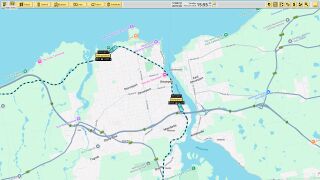 Google Maps Roads
 -
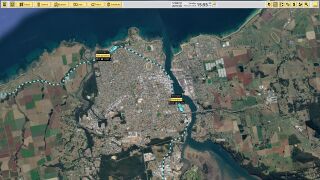 Google Maps Satellite
 -
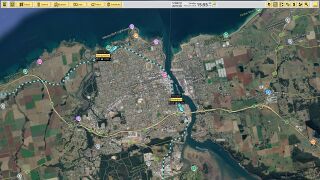 Google Maps Hybrid (satellite+road)


Other Examples - Devonport, Tasmania, Australia
-
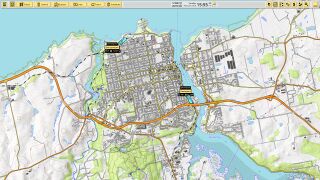 OpenTopoMap
 -
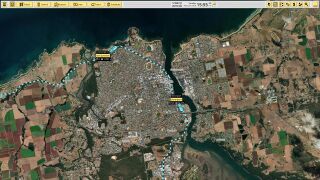 ERSI Satellite Imagery


Other Examples
-
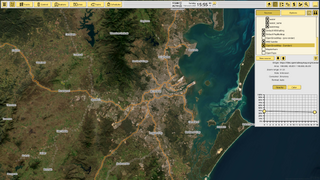 ERSI Satellite Imagery + Open Railway Map
Zoomed out -
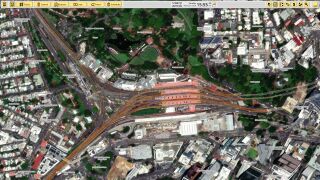 ERSI Satellite Imagery + Open Railway Map
Zoomed In -
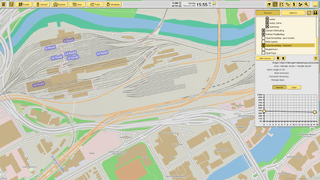 Open Railway Map
Zoomed In - West Melbourne Rail Yard
.png)

.png)